
Canva Ad Publishing: Design & Launch Ads Without Leaving the Platform (2025 Guide)
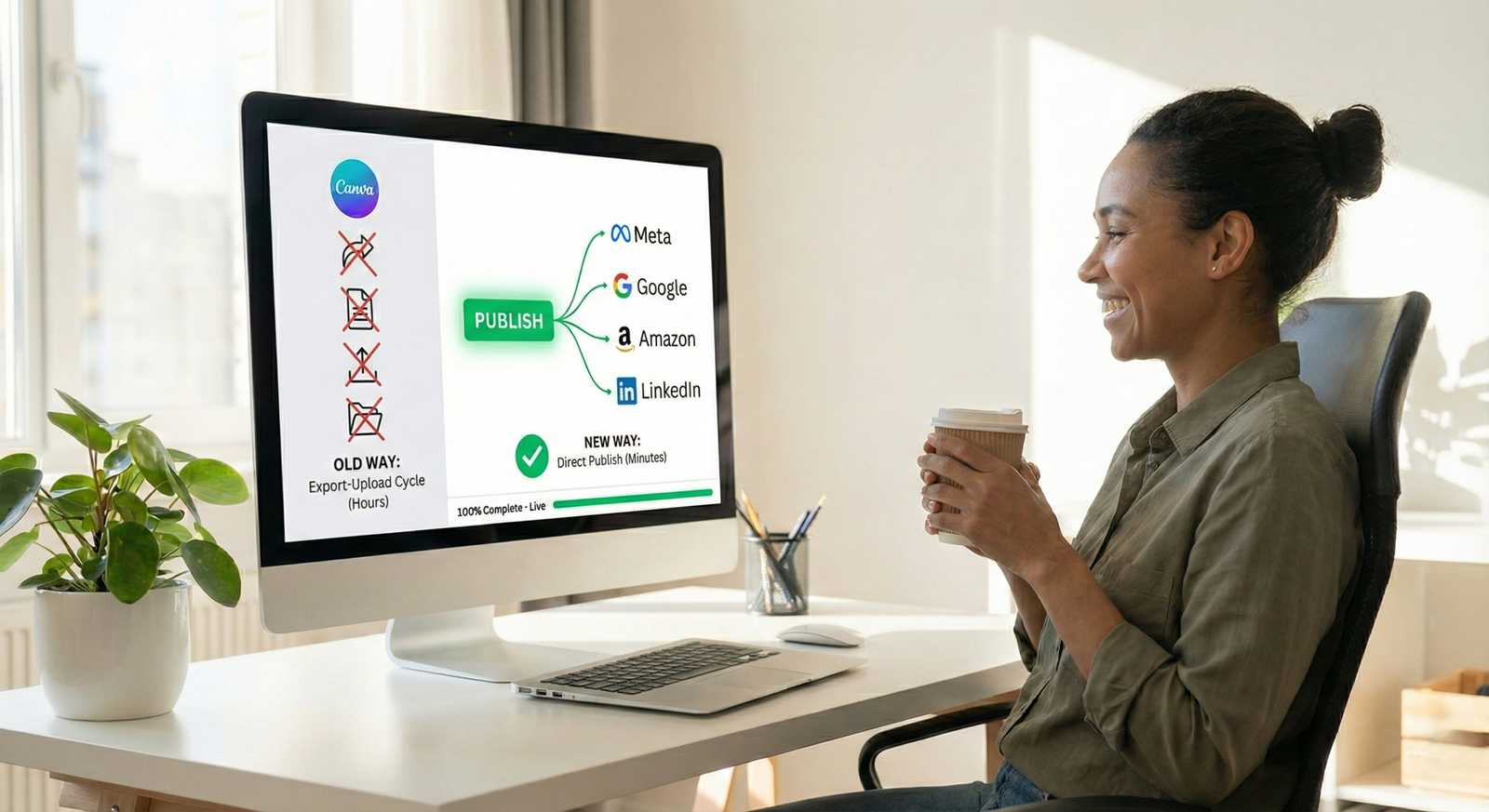
Canva ad publishing just killed the most annoying part of being a marketer. You know exactly what I’m talking about. You spend an hour designing the perfect Facebook ad in Canva. It looks amazing. You’re proud of it. Then you export it, open Ads Manager, upload it, and… the text is cut off. Or the image ratio is wrong. Or Meta rejects it for some random policy violation. So you go back to Canva. Fix it. Export again. Upload again. Wait for approval. Repeat. It’s exhausting, time-wasting, and honestly? Just plain stupid in 2025. Well, that nightmare just ended. With Canva ad publishing, you can now design AND publish ads directly to Meta, Google, Amazon, and LinkedIn without ever leaving the platform. No downloads. No uploads. No switching between twelve browser tabs while your coffee gets cold. Let me show you how this actually works. How Canva Ad Publishing Actually Changed Digital Marketing Canva isn’t just a design tool anymore. They partnered with every major advertising platform to eliminate that soul-crushing export-upload cycle we’ve all suffered through. These new integrations mean your ads go live in minutes, not hours. You design it, you click publish, and you’re done. Actually done. Where You Can Publish Ads Directly (Right Now) Meta (Facebook & Instagram)Design your ad, connect your Meta account once, and publish directly to Facebook and Instagram without leaving Canva. One click. Live ad. Done. Google AdsCreate display ads with the exact specs Google wants, then export straight to Google Ads Manager. No file downloads needed. Amazon AdsThe Amazon Ads app inside Canva lets you pull existing assets, design with all of Canva’s tools, run real time policy checks, and publish back to Amazon. LinkedIn AdsDesign professional image or video ads, then send them straight to LinkedIn Campaign Manager. Zero downloads, zero uploads, zero headaches. The Real Game Changer: Canva Grow (It’s Actually Impressive) Here’s where Canva ad publishing gets interesting. They didn’t just add publish buttons, they built an entire AI-powered marketing platform called Canva Grow. What Canva Grow Actually Does AI That Generates Ads for YouDrop in your website URL and some product photos. The AI generates ready-to-launch ads based on your brand, audience, and what’s actually working in your industry right now. Real Ads from Real BrandsBrowse thousands of high-performing ads from successful companies. Filter by your industry to see what’s crushing it in your niche this month. Actual One-Click PublishingLaunch ads to Meta without touching an export button. Whether you’re selling skincare, promoting online courses, or launching new products, your ads go live instantly. Performance Tracking That Makes SenseSee how your ads perform with a dashboard that’s actually readable. It shows what’s working, what’s dying, and exactly what to change. Using Canva Ad Publishing: Step-by-Step Guide Publishing Ads to Meta with Canva Ad Publishing Step 1: Design your ad using Meta’s templates (they’re already the right size)Step 2: Use the Meta Design Check app to catch issues before publishingStep 3: Connect your Meta account (you only do this once)Step 4: Click “Publish to Meta” right from CanvaStep 5: Track performance without leaving Canva No exports. No file management. No insanity. Publishing to Google Ads Step 1: Pick a Google Ads template (all the right dimensions built in)Step 2: Design your adStep 3: Click “Export to Google Ads”Step 4: Your ad appears in Google Ads Manager automatically Get started with Google Ads integration → Publishing to Amazon Step 1: Connect your Amazon Ads accountStep 2: Pull existing assets from your Amazon libraryStep 3: Design using Canva’s toolsStep 4: Run real-time policy checks (catches violations instantly)Step 5: Publish directly back to Amazon Try the Amazon Ads app → Publishing to LinkedIn Step 1: Design with LinkedIn-optimized templatesStep 2: Export directly to your LinkedIn accountStep 3: Launch in LinkedIn Campaign ManagerStep 4: Zero manual file handling Explore LinkedIn integration → Advanced Benefits of Canva Ad Publishing Features Policy Checks Before You Publish (This Saves Hours) Before anything goes live, Canva ad publishing checks your ads against platform policies and flags problems. No more getting rejected after you’ve already uploaded. Actually Useful Performance Insights Canva Grow shows you which parts of your ads work and why. Not just vanity metrics—actual insights you can use. You’ll see: Your Brand Stays Consistent Without Effort With Brand Kit integration, every ad automatically uses your correct fonts, colors, and logos. No more hunting through folders for the right logo file. Team Collaboration Without Email Chaos Your team can work on ads together, leave comments, and make changes in real-time. No more “final_v3_FINAL_really_final_FOR_REAL_THIS_TIME.png” files. Canva Ad Publishing Pricing: What It Costs Canva Free: Canva Pro ($14.95/month): Canva for Teams ($10/person/month, billed annually): Enterprise (Custom Pricing): For Meta ad integration, free accounts work. But for full Canva ad publishing through Canva Grow (AI generation, insights, tracking), you need Pro or higher. Honestly? If you run ads regularly, Pro pays for itself in time saved on the first campaign. Compare plans and pricing → Real Results from Real Businesses StartupX switched to Canva for all their ads and tracked these results:
Canva Ad Publishing: Design & Launch Ads Without Leaving the Platform (2025 Guide) Read More »